

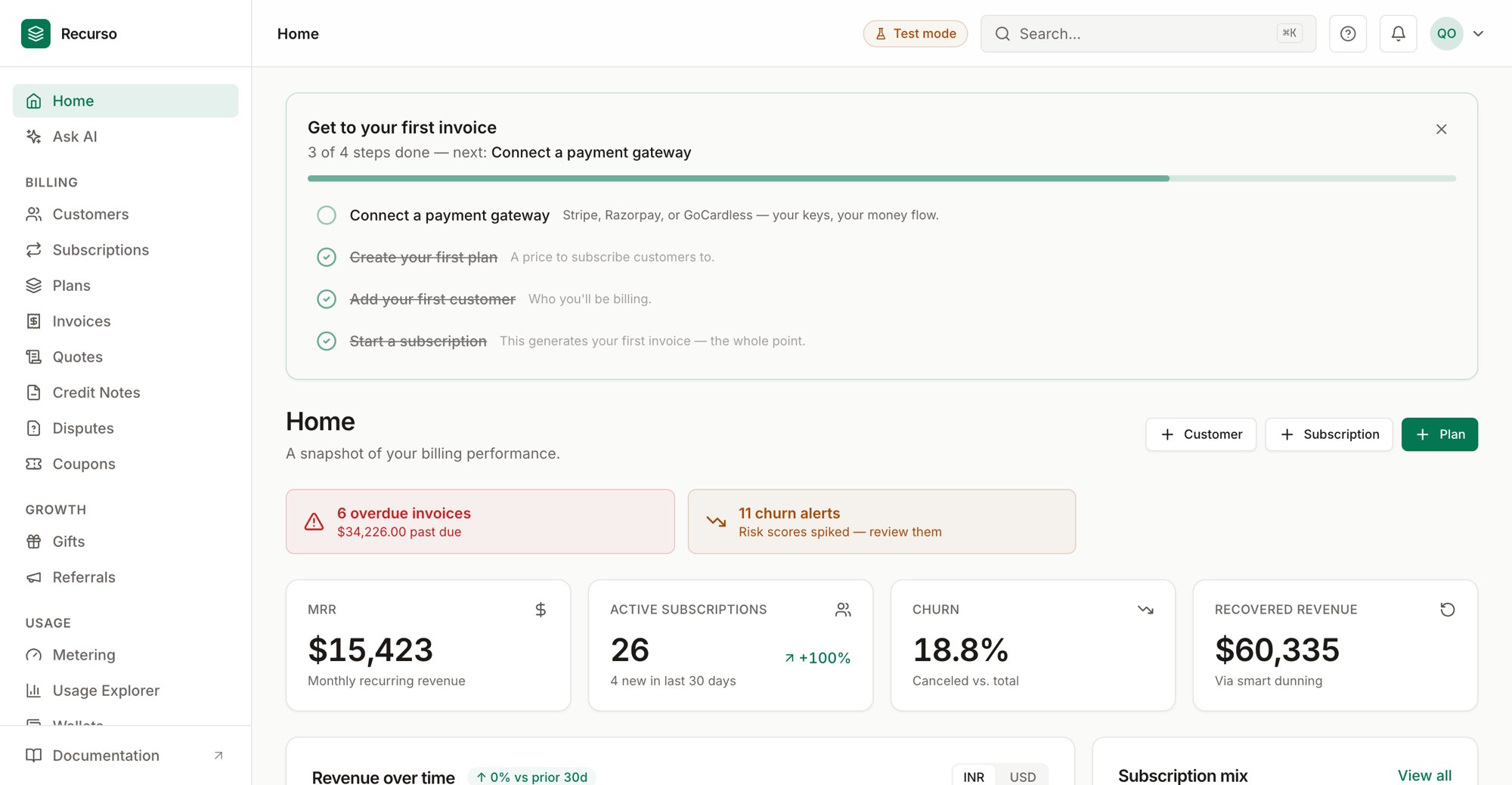
The Recurso dashboard home
Home and Executive Summary
Recurso opens on Home — the landing screen at the root of the dashboard. It answers two questions fast: what needs my attention today and how is billing trending. A deeper, board-grade view lives one click away under Executive Summary.Every tile and strip on these screens is a link. Click a KPI or an alert to
jump straight to the section it summarizes.
Home
The header carries quick-create buttons for Customer, Subscription, and Plan — each opens the matching create flow.Needs attention
A strip below the header surfaces anything that needs action right now, built from live data:- Overdue invoices — count and the total past due (per currency), links to invoice aging.
- Open disputes — chargebacks waiting on you, links to Disputes.
- Churn alerts — customers whose risk score spiked, links to Churn risk.
KPI row
Four stat cards summarize the account:Charts and recent activity
- Revenue over time — an area chart of invoiced revenue over the trailing 90 days. Each currency gets its own line (amounts in different currencies are never summed without FX).
- Recent invoices — the eight newest invoices with customer, amount, and a status badge. Click a row to open that invoice’s detail sheet; View all goes to Invoices.
Executive Summary
Open Executive Summary (the MRR card on Home links here) for a fuller revenue read-out. A period toggle in the header — 30d / 60d / 90d — sets the window for the movement and retention figures.Each metric is fetched independently, so if one source is unavailable that
single tile shows a dash (
—) rather than breaking the whole page.Revenue
Charts
- MRR trend — end-of-month MRR for the last six months (appears once you have at least two months of history).
- MRR movement — what grew and shrank in the selected window.
MRR movement
New, Expansion, Contraction, and Churned for the window. Churned turns red when cancellations outpace new plus expansion.Unit economics
ARPA (per account), ARPU (per subscription), LTV (at current churn, needs history), and Active customers with a subscription count.Cash & recognition
Outstanding and Overdue receivables, Deferred revenue, and Recognized (MTD). Overdue is flagged amber or red as it grows as a share of outstanding. Every card links to the matching finance report so you can drill in.Where to go next
Customers
Add and manage the people you bill.
Subscriptions
Create and manage recurring billing.
Invoices
Every invoice and its status.
Payments & mandates
Offline payments, virtual accounts, and UPI mandates.