

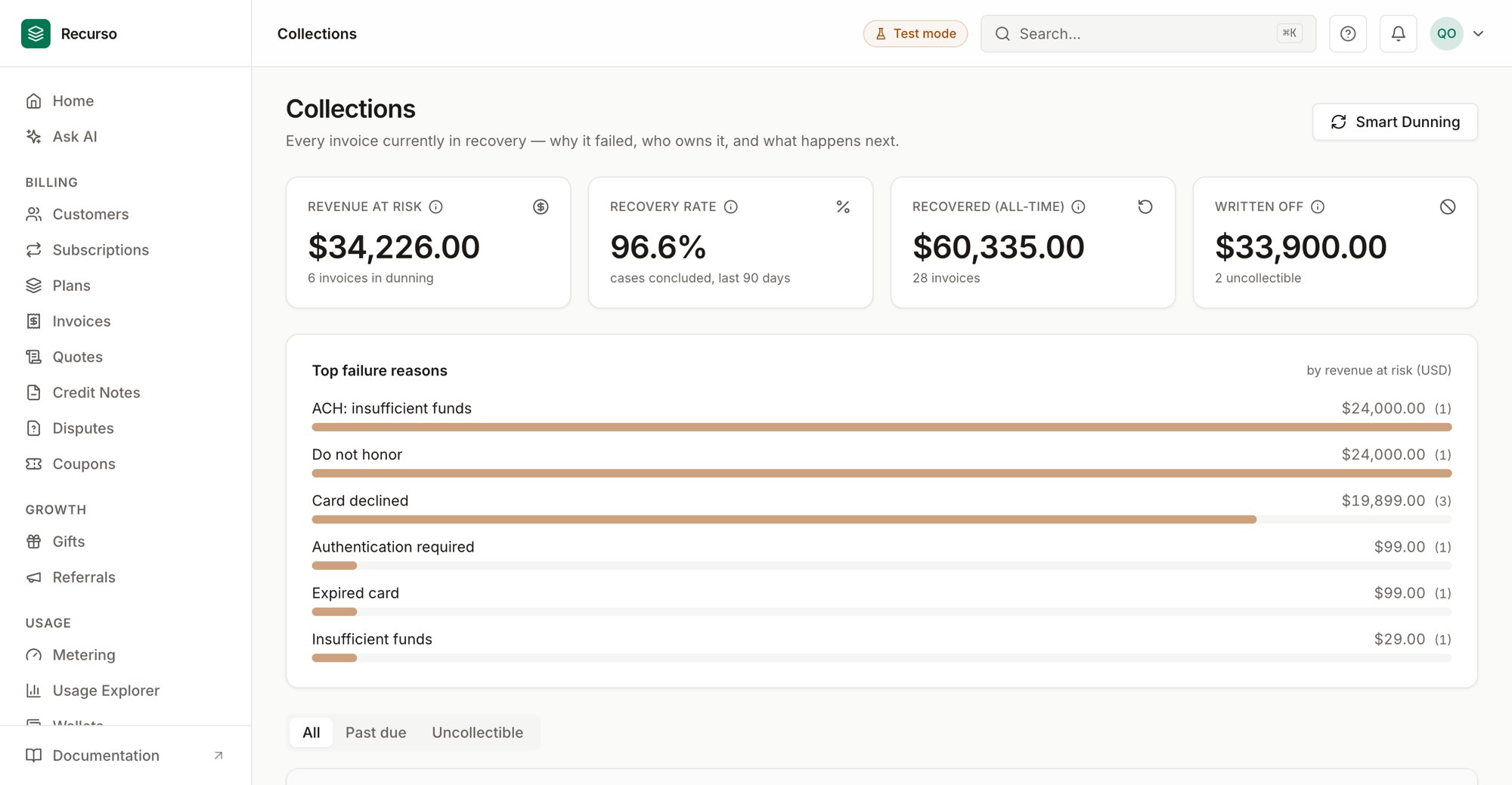
The Collections worklist in the Recurso dashboard
The operator view of recovery
Collections (under Payments) is the operator view of payment recovery. The automated engine — smart dunning retries, campaigns, ACH settlement tracking — does the collecting; this page makes its state legible and actionable: who is failing right now, why, what the machine will do next, and the levers to intervene.The worklist
Every invoice currently in recovery appears in the table:past_due invoices
being chased and uncollectible invoices that were written off but still carry
a balance. Each row shows:
- Customer and invoice number
- Amount still owed (currency-aware)
- Days overdue, color-ramped as it ages
- Last failure — the gateway decline or ACH return code, humanized (“Insufficient funds”, “ACH: account closed”)
- Next retry — when the engine tries again, or a paused badge
- Owner — which engine is managing it:
scheduler(email escalation),worker(smart retries), orcampaign(multi-step sequences) - ACH state chips: settling while a bank debit is in flight, returned after a bank claw-back reopened the invoice
The funnel and failure reasons
Above the worklist:- Revenue at risk — open money currently in dunning, FX-normalized to your reporting currency
- Recovery rate — of the cases concluded in the last 90 days (recovered or written off), the share recovered. A windowed cohort, so the number reflects how collection is performing now, not the whole history
- Recovered (all-time) and Written off totals
- Top failure reasons — decline codes ranked by how much revenue each is holding, so you can see whether the problem is expired cards, insufficient funds, or something systemic
If some invoices are in a currency with no exchange rate available, the money
figures exclude them (never mis-summed) and the page shows an “amounts are
understated” note listing the affected currencies. Counts always include every
invoice.
Manual controls
Each row’s action menu lets you intervene without fighting the automation:Retry now
Queues an immediate charge attempt through the smart-retry engine (picked up within seconds). Guardrails refuse the retry — with a clear reason — when it could double-charge:- the invoice’s dunning is paused,
- it’s a UPI AutoPay mandate invoice (mandates can’t be gateway-retried),
- an ACH debit is still settling (never stack a second charge on money in flight),
- or the invoice isn’t actually past due anymore.
Pause / resume dunning
Pausing stops all automated contact and charging for that invoice — retry charges, escalation emails, and campaign steps (emails, SMS, payment walls) alike. Use it while negotiating with a customer or investigating a dispute. Resuming picks the schedule back up where it left off.Mark uncollectible
The manual write-off. The invoice stops being chased and moves touncollectible (a status change — you can still record a manual payment later
if the money ever arrives). The write-off date feeds the recovery-rate cohort.
Best time to retry
The Smart Dunning page includes a Best time to retry card: historical retry success rates by hour of day (UTC) and day of week, with the best-performing windows highlighted once there’s enough history to trust. It’s an insight into when your customers’ payments succeed — the live retry engine keeps learning independently.Where to go next
- Smart Dunning — the automated engine behind this page
- Set up ACH bank debits — the US bank-debit lifecycle
- Set up dunning — retries, campaigns, and emails