

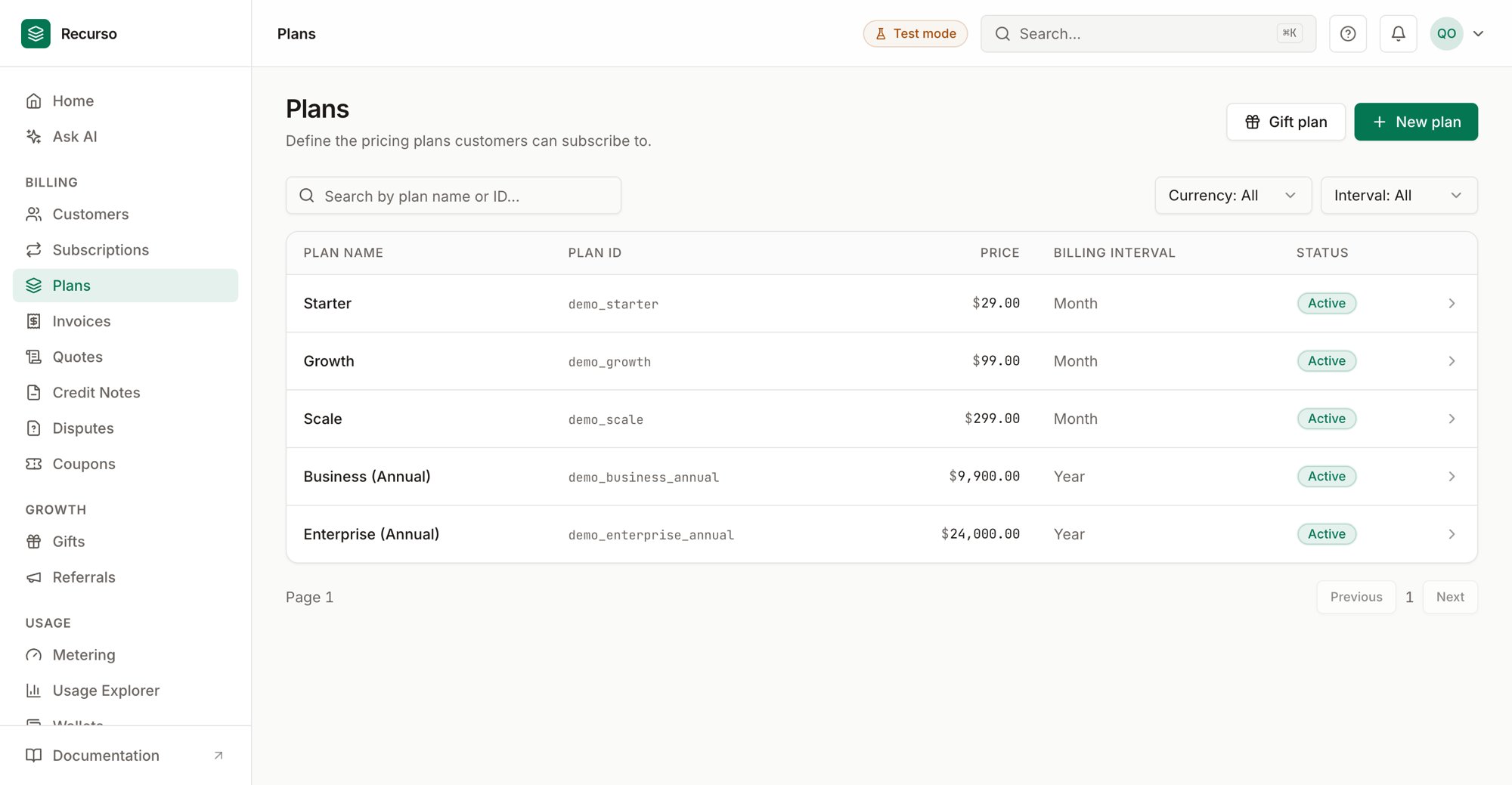
The Plans & products page in the Recurso dashboard
The plan list
Plans (in the left nav) is your billing catalog. A plan defines a recurring price, the interval it bills on, the feature entitlements it unlocks, and any usage charges that bill on metered consumption. Customers subscribe to a plan; everything else in the dashboard — subscriptions, invoices, quotes — points back to one. The list shows every plan with these columns:
Search by plan name or ID, and narrow the list with the Currency
(All / USD / INR) and Interval (All / month / year) filters. The list pages
ten plans at a time.
The Gift plan button in the header purchases a gift subscription against a
plan — see Gifts & referrals.
Create a plan
1
Open New plan
Click New plan. A side panel opens.
2
Enter plan details
- Plan name (required) — e.g. Pro Tier.
- Plan code (slug) (required) — e.g.
pro-monthly. This is the stable identifier; it can’t be changed later. - Description — optional.
3
Set the price
Enter a Price and pick a Currency (USD, INR, EUR, GBP), then choose a
Billing interval — Monthly or Yearly. Click Create plan.
The plan detail panel
Click any row to open the plan’s detail sheet. It shows the plan’s price, billing interval, currency, code, created date, and HSN/SAC tax code, and groups everything you can edit into three sections.Edit plan & archive
Edit plan lets you change the name, interval unit (day / week / month / year), interval count, and HSN/SAC code (leave empty to fall back to the tenant default). Price and code stay locked. Archive takes a plan out of circulation: archived plans can’t be used for new subscriptions, but existing subscriptions keep billing normally. Restore brings it back. Both actions confirm first.Entitlements
Entitlements are the features a plan unlocks. Click Edit to add rows, each with a feature key and a kind:- boolean — a simple on/off flag (the Enabled checkbox).
- limit — a numeric cap (e.g.
api.calls=10000).
. _ : -, must start with a
letter or number, and must be unique within the plan. Saving an empty list
removes all entitlements from the plan.
Usage charges & tiers
The Usage charges section is where metered pricing lives. Each charge ties a billable metric to a charge model. You add charges the same way you edit entitlements — click Edit charges, add a row, pick the metric and model, then Save charges (the whole set is replaced on save).Charges reference billable metrics defined on the
Metering & usage page. If you have no metrics yet,
the editor prompts you to create one first. A metric can only be charged once
per plan.
Building tiers
For graduated and volume, you build a tier table. Each tier has an Up to (units) bound, a Rate/unit, and an optional Flat fee:- Bounds must increase down the table.
- The last tier is unbounded — its “up to” field is left empty (shown as ∞).
- Add rows with Add tier; remove them with the trash icon.
Related
Metering & usage
Define the billable metrics that usage charges reference.
Subscriptions
Put customers on a plan and manage plan changes.
Coupons
Discount a plan’s price at checkout.
Quotes
Send a priced quote that converts into billing.